> For the complete documentation index, see [llms.txt](https://docs.fullsession.io/llms.txt). Markdown versions of documentation pages are available by appending `.md` to page URLs; this page is available as [Markdown](https://docs.fullsession.io/billing-subscriptions.md).
# 17. Billing & Subscriptions
FullSession billing is handled through **Stripe** and managed under **Settings → Subscription**. This chapter covers the plans, how to subscribe and change plans, payment methods and promo codes, how to read your usage against quota, what happens when a payment fails, and what happens when you cancel.
Billing is gated by permissions: anyone with the **view subscription** permission can see the page; only those with **manage subscription** (typically the account owner/admin) can change plans, payment, or cancel.
***
### 17.1 Plans & What They Include
FullSession offers four plans, plus separate **Web** and **Mobile** product lines.
#### The plans
| Plan | Best for |
| -------------- | ----------------------------------------------------------------------------- |
| **Free** | Trying FullSession on a small site |
| **Growth** | Teams that need funnels, event tracking, alerts, and integrations |
| **Pro** | Growing product, growth, and engineering teams that want dashboards & Lift AI |
| **Enterprise** | Organizations needing custom limits, SSO, RBAC, and a tailored agreement |
#### What differs between plans
Each plan sets the limits and features available to your account:
| Dimension | Controls |
| ------------------------ | -------------------------------------------------------------------------- |
| **Monthly sessions** | How many sessions you can record per billing period |
| **Team members (seats)** | How many users your account can have (some plans are unlimited) |
| **Domains / sites** | How many sites you can track |
| **Data retention** | How long recorded sessions are kept (\[Chapter 5, section 5.7]) |
| **Features** | Which capabilities are unlocked — e.g. funnels, Lift AI, alerts, RBAC, SSO |
Within a plan, you pick a **tier** based on your monthly session volume (e.g. a "5,000 monthly sessions" option), and choose **Web** or **Mobile** depending on what you're tracking.
#### Which plan unlocks what
Features unlock cumulatively — anything listed for Growth is also on Pro and Enterprise.
| Feature | Available from |
| ------------------------------------------------------ | -------------- |
| Session replay, heatmaps, feedback & surveys, segments | **Free** |
| Funnels, funnel effort analysis, funnel trends | **Growth** |
| Conversion analysis | **Growth** |
| Event tracking, custom events, customer attributes | **Growth** |
| Element watcher & element labels | **Growth** |
| Alerts | **Growth** |
| UTM tracking | **Growth** |
| Smart Filter (AI-generated segment filters) | **Growth** |
| Integrations | **Growth** |
| Dashboards & Charts (dynamic dashboards) | **Pro** |
| Lift AI | **Pro** |
| Role-based access control, custom roles & audit log | **Enterprise** |
| Single Sign-On (SAML) | **Enterprise** |
| SLA | **Enterprise** |
> **How gating looks in the app.** Navigation items you don't have carry a small **plan badge** naming the first plan that includes them (*Growth*, *Pro*, *Enterprise*). Opening a locked area shows a lock overlay reading *"\[Feature] feature is available from \[Plan] plan"* with an **Upgrade plan** link that takes you straight to **Settings → Subscription**. The page still loads — it's just not interactive.
> **Enterprise pricing can be custom.** Enterprise also offers self-serve tiers with set session-volume options you can subscribe to directly from the plan chooser, same as Growth and Pro. Beyond those tiers, Enterprise pricing can be tailored to your account, with the option to override standard session, member, domain, retention, and feature limits — those custom terms are arranged with FullSession rather than self-served.
***
### 17.2 The Free Plan & Trial
#### The Free plan
FullSession includes a **Free plan** so you can use the product without a paid subscription. It has modest limits (sessions, members, domains, retention) suitable for small sites or evaluation. If you cancel a paid plan, your account automatically returns to Free (section 17.8).
Free is a real subscription rather than an absence of one: selecting it in the plan chooser subscribes you immediately (no checkout step), and moving from Free to a paid plan ends the Free subscription as part of the switch.
#### The trial
New accounts start with a **14-day trial** that includes generous starter limits:
| Trial resource | Amount |
| ---------------- | ------ |
| **Sessions** | 5,000 |
| **Team members** | 5 |
| **Domains** | 3 |
While the trial is still running, the plan chooser shows your status as *"Your free trial status: \[N] days Left"* (or *"Expired"*) and **hides the Free plan** — you can only move up to a paid plan, not sideways to Free. Once the trial expires, Free becomes selectable again.
When the trial ends, you'll either be on a paid subscription (if you subscribed) or fall back to the Free plan's limits. Subscribe before the trial ends to avoid interrupting recording.
> **Upgrade prompts during the trial.** A trial panel elsewhere in the app offers an **Upgrade** shortcut into the plan chooser, plus a short *"How can we help you today?"* form for asking FullSession about **customized plans & invoicing** or **payment methods**. Only the account owner can upgrade — other members see *"Just the owner can upgrade the plan."*
***
### 17.3 Subscribing & Changing Plans
You subscribe and change plans from **Settings → Subscription** (requires the **manage subscription** permission). The **Your Plan** block has an **Adjust Plan** button that opens the plan chooser.
#### Choosing a plan
1. Click **Adjust Plan** to open the chooser ("**Choose a plan**").
2. Pick the product line — **Web** or **Mobile**.
3. Choose **Yearly** or **Monthly** billing. Yearly shows the discount as **"Save XX%."**
4. Select the plan card, then the **tier** (session volume) from its dropdown — tiers are labelled like *"5,000 monthly sessions."*
5. Continue to checkout, enter payment (section 17.4), optionally add a **promo code** (section 17.5), and **Subscribe**.
Each card shows the plan name, its description, and a **"From \[price]/mo"** figure for the currently selected tier and billing term. The footer restates your choice as **"Selected Rate: \[price]/mo"**, and on yearly billing adds the **annual total** in parentheses. A **Learn more about our Pricing Plans** link opens the public pricing page for a full side-by-side comparison.
> **Nothing to confirm when nothing changed.** If the plan, tier, and billing term you've selected match what you're already on, the action button is hidden — there's no way to "re-subscribe" to your current plan by accident.
> **Deep links from the pricing site.** Opening the subscription page with plan parameters in the URL (plan name, tier index, yearly/monthly, web/mobile) pre-selects that combination and opens the chooser automatically. This is how the **Upgrade** buttons on the public pricing page hand off into the app; the parameters are cleared from the URL once applied.
#### Yearly vs. monthly
Billing can be **annual** or **monthly**. Annual billing is discounted; the chooser shows the effective monthly cost, the annual total, and the percentage saved compared with paying monthly.
#### Changing plans (upgrade or downgrade)
To move between plans or tiers, open **Adjust Plan** and confirm with **Change Plan**.
> **Plan changes take effect immediately, and the billing cycle resets.** Both upgrades and downgrades apply right away, starting a fresh billing period. FullSession does **not** prorate — there's no partial credit or charge for the unused portion of your previous cycle. Plan with that in mind, especially when downgrading mid-cycle.
A plan change is confirmed asynchronously: FullSession waits for Stripe to confirm the new subscription before the page updates, then shows *"Successfully changed the plan."* You'll also get a **plan-change notification** (section 17.9).
***
### 17.4 Payment Methods
FullSession stores a **single payment method** per account through Stripe.
#### Adding or changing your card
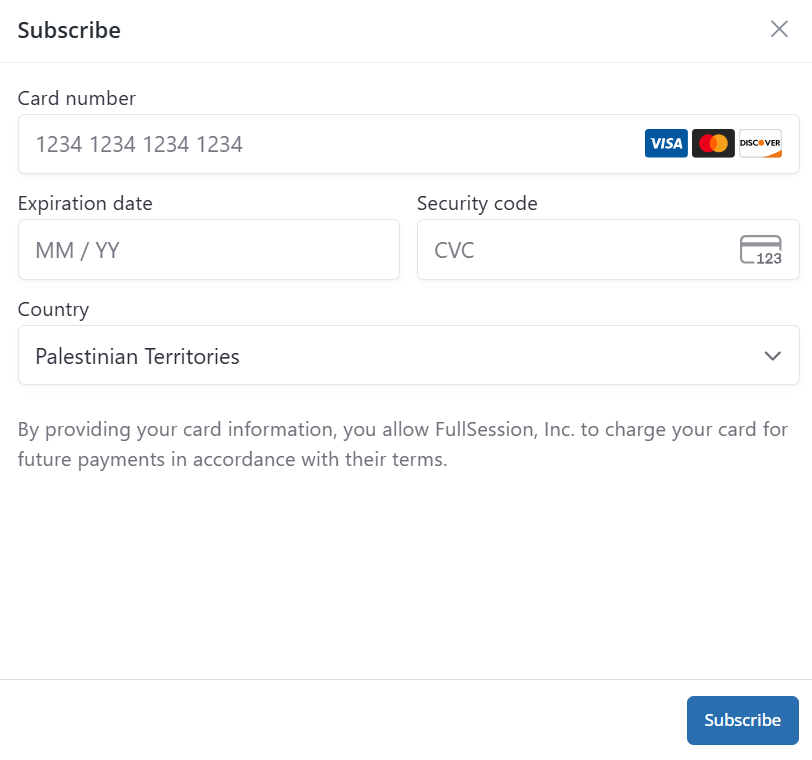
* During checkout (or via **Change Payment Method**), you enter card details in Stripe's secure form.
* Your saved card is shown as its **brand, country, and last four digits**.
* Setting a new card **replaces** the previous one — only one payment method is kept on file at a time.
The **Change Payment Method** button appears only once you're on a paid subscription; on Free there's no card on file to change.
> Card data is handled by Stripe; FullSession never stores full card numbers.
***
### 17.5 Promo Codes
If you have a promotional or discount code, apply it during checkout.
1. In the plan chooser, find **Insert Promo Code**.
2. Enter the code and click **Activate Code**.
3. FullSession validates it. If valid, the **discount** (a percentage or fixed amount, applied once, repeating, or forever depending on the code) is reflected in the displayed price. If not, you'll see an error and can try another.
A valid code is applied to your subscription when you complete checkout.
> **Codes are validated against a specific plan and tier.** A code can be restricted to particular plans or session tiers, so the discount only shows on the prices it applies to. If you change plan, tier, or billing term after activating a code, re-activate it to see the updated price.
#### When a code is rejected
An invalid code clears the field and raises a **Promo Code Error** panel — *"the promo code inserted is incorrect"* — with a **Retry** action that puts the code back in the box so you can correct a typo. The panel dismisses itself after a few seconds, or you can close it.
***
### 17.6 Usage & Quota
The subscription page shows your **current usage against your plan's limits**, so you always know where you stand.
#### What's shown
* Your **plan name**, with a status suffix where one applies — **"– CANCELLED"** after you cancel, or **"– EXPIRED"** once a cycle has lapsed without renewal.
* **Sessions used vs. total** for the current billing period, as *"\[N]% — \[used] of \[total] sessions used"* with a **progress bar**.
* Your **Sessions** and **Members** allocation (members shows **Unlimited** where applicable).
* **Quota Period Resets: \[date]** — when your session count rolls over (or **Subscription ends at: \[date]** if you've cancelled). Custom Enterprise agreements arranged with FullSession don't show a reset date, since their term is set by agreement; self-serve Enterprise subscriptions started from the plan chooser show one like any other plan.
#### How the quota is split across sites
Your session quota is account-wide, but it's **divided between your sites by percentage**. Each site has a **Recording %** under **Settings → Manage Domains**, and the percentages across all your sites must add up to **100%**. A site's effective limit is its percentage of the plan's monthly sessions.
The **site picker** in the top bar shows each site's usage against its own share — *"\[recorded] / \[limit] sessions"* with a small bar — so you can spot the site that's consuming the quota before the account total gets close.
> **Rebalance rather than upgrade, where you can.** If one site is starved while another barely records, adjust the Recording % split before moving to a larger tier.
#### What happens at the limit
> Session limits are **hard caps** — there's **no overage billing or soft limit**. When you reach your monthly session quota, FullSession **stops recording new sessions** until the quota resets or you upgrade. Existing data remains viewable. To avoid hitting the cap, monitor this panel, exclude internal users (\[Chapter 4, section 4.4]), and scope recording with page rules (\[Chapter 7, section 7.2]).
***
### 17.7 Failed Payments & Renewals
Subscriptions renew automatically at the end of each billing period. If a renewal payment fails, what happens depends on when it fails.
| Situation | What happens |
| ----------------------------------------------- | -------------------------------------------------------------------------------------------------------------------------------------------------------------------------------------------------------------------- |
| **Renewal fails at the end of your cycle** | The paid subscription ends and the account moves to the **Free plan** — but your previous plan's **data-retention period is carried over**, so existing recordings stay viewable for as long as they would have been |
| **Payment fails while changing plan mid-cycle** | Your **current plan continues** unchanged to the end of the period — the attempted change simply doesn't take effect |
| **Payment fails during the trial** | You stay on the **trial** for its remaining days; the account falls back to Free only once the trial has ended |
In every case a **payment-failed notification** is raised (section 17.9) naming the amount, the plan that was attempted, and the attempt date.
> **Fixing a failed payment.** There's no in-app "retry payment" button. Update your card under **Change Payment Method** (section 17.4) and, if the account has already dropped to Free, subscribe again (section 17.3).
***
### 17.8 Cancellation & Your Data
You can cancel a paid subscription from the **End Subscription** section of the subscription page (requires **manage subscription**).
#### How cancellation works
1. Click **Cancel your Subscription**.
2. Confirm in the prompt (*"Are you sure you want to cancel your subscription?"*).
What happens next:
* Your plan is **marked as cancelled** immediately (shown as *"– CANCELLED"*), but the subscription **remains active until the end of the current billing period** — you keep access until then.
* The **Cancel your Subscription** button is disabled from that point on; there's nothing further to do.
* At the end of the period, the paid subscription ends and your account **automatically reverts to the Free plan**.
* **Your team loses access to recorded session data** that exceeds the Free plan's limits. Export anything you need first (\[Chapter 5, section 5.6]; \[Chapter 9, section 9.8]).
> **No "reactivate" button.** There isn't a resume/reactivate flow. To return to a paid plan after cancelling, simply **subscribe again** (section 17.3) by choosing a plan.
> **Free plan cancellation** is handled separately — cancelling the Free plan doesn't delete your account the way a profile-level account deletion does (\[Chapter 16, section 16.5]).
***
### 17.9 Billing Notifications & Emails
Billing events reach you through the **notification center** (\[Chapter 15, section 15.6]) rather than a billing history page:
| Event | You're told |
| ------------------ | --------------------------------------------------------------------- |
| **Plan changed** | The previous plan, the new plan, and the date the change takes effect |
| **Plan cancelled** | The cancelled plan and the date access actually ends |
| **Payment failed** | The amount due, the plan that was attempted, and the attempt date |
Separately, Stripe emails your **payment confirmations and receipts**, and FullSession sends a **welcome email** the first time you move from trial or Free onto a paid plan.
***
### 17.10 Billing Admin & Limitations
#### Who can manage billing
| Permission | Allows |
| ----------------------- | ---------------------------------------------- |
| **View subscription** | See the subscription page, plan, and usage |
| **Manage subscription** | Subscribe, change plan, update payment, cancel |
**Manage subscription** is typically held by the account **owner/admin**, and can be granted via a custom role (\[Chapter 16 — Team & Account Management]).
#### What billing doesn't include
To set expectations clearly, these **don't exist** in FullSession's billing interface:
* **No in-app invoices, receipts, or billing history.** Payment confirmations come from Stripe by email; there's no invoice list or download inside FullSession, and no link to a self-serve billing portal.
* **No proration** on plan changes (section 17.3).
* **No usage overage billing** — limits are hard caps (section 17.6).
* **No à-la-carte add-ons or extra-seat purchases** — seats and limits are set by your plan (Enterprise uses custom overrides).
* **No retry-payment action** after a failed charge (section 17.7).
* **No in-app tax/VAT breakdown** or plan-comparison matrix (a full comparison lives on the public pricing page).
> **The big picture** — FullSession bills through **Stripe** with **Free, Growth, Pro, and Enterprise** plans across **Web and Mobile** lines and **monthly/annual** terms. Subscribing, **immediate non-prorated** plan changes, a **single saved card**, **promo codes**, and a live **usage-vs-quota** view all live on the **Subscription** page. Session quota is **split across sites by Recording %**, limits are hard caps, a failed renewal drops you to **Free with your old retention carried over**, and cancellation is **end-of-period with an auto-revert to Free** (and loss of access to recorded data beyond Free's limits). Billing events arrive as **notifications**; there's no in-app invoice history — receipts come from Stripe.
***
> **Next up:** \[Chapter 18 — Single Sign-On (SSO)] covers enterprise authentication — SAML/identity-provider configuration, domain verification, and the `sso:*` permissions that govern it.